
Home › Forum › Technical support › Maps folder not working
-
Maps folder not working
Posted by Bxst on March 23, 2026 at 3:06 pmHi,
It would be nice to have custom maps, as most players play with custom maps. My problem is that I don’t have a “Maps” folder. When I create it myself and put the downloaded maps there, they don’t appear in the game. I don’t know if I need to force the game to create this folder automatically. I’ve watched many guides, but my game still doesn’t see the maps in the game. How can I fix this so that the maps work properly in the game?
Bxst replied 7 months ago 2 Members · 8 Replies -
8 Replies
-

Where do you have the game from?
By default the folder is located inC:\Users\<YourName>\AppData\Roaming\Command & Conquer 3 Kane's Wrath\Maps
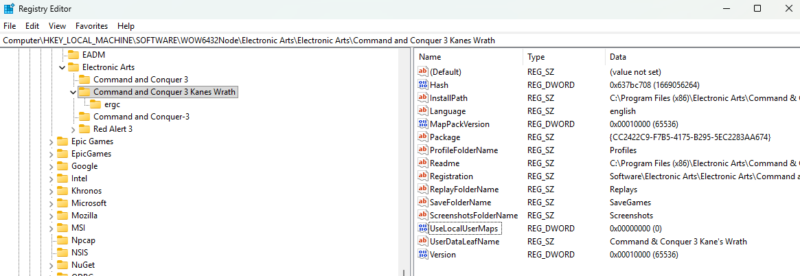
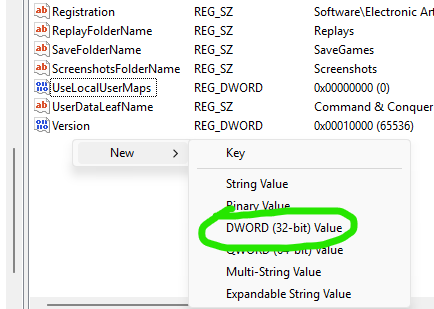
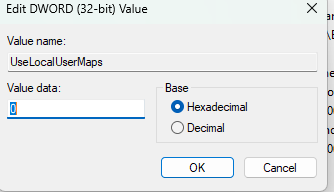
In some cases especially when you have the game from EA app its missing a registry key UseLocalUserMaps.
You will have to add this registry inComputer\HKEY_LOCAL_MACHINE\SOFTWARE\WOW6432Node\Electronic Arts\Electronic Arts\Command and Conquer 3 Kanes Wrath
See images below.
If you do not know how to do this you can also run the below tool to fix the registry.
https://kaneswrath.com/downloads/download/KWTroubleshooter.zip
-

Thank you for your reply. My game is from EA Apps. My Maps folder is manually created and I added the downloaded maps to it. I also added this key earlier: UseLocalUserMaps. I restarted my computer, entered the game, and still no maps in the game. There needs to be a MapCache.ini file in the Maps folder, I created it as well (as a non-text document) and the maps still don’t appear in my game.
-
-
-
-
I just checked it myself on EA app and it works, can you show a clear screenshot of the location in registry
Computer\HKEY_LOCAL_MACHINE\SOFTWARE\WOW6432Node\Electronic Arts\Electronic Arts\Command and Conquer 3 Kanes Wrath
Or join Discord https://discord.gg/dnkF8pG
-
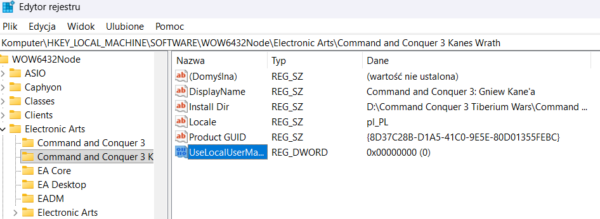
Sure, I had it like you showed before and that’s what it looks like
-
This reply was modified 7 months ago by Bxst.
-
Found it, you put it in the wrong folder
It should be in here\HKEY_LOCAL_MACHINE\SOFTWARE\WOW6432Node\Electronic Arts\Electronic Arts\Command and Conquer 3 Kanes Wrath
So twice \Electronic Arts\Electronic Arts\
-
oh yes!! thank you very much, everything works great, now I can play on custom maps thank you for your help very much bro 😀
-
-
This reply was modified 7 months ago by
-
-
-

Log in to reply.