 Administrator
 Yourhorse
AdministratorForum Replies Created
-

Yourhorse
AdministratorAugust 20, 2026 at 2:29 am in reply to: Bad performance after updating to R25 with 4k addonYou can download and downgrade back to R24 and see if it preforms better for you?
We have not received any issues regarding to FPS drops.
Link to R24 https://kaneswrath.com/download/r24-all-in-one-map-pack/kaneswrath.com
R24 All in One Map Pack - Kanes wrath
All R24 maps in one download. Includes Map Pack 1, Map Pack 2, Map Pack 3, and the Legacy Map Pack.
-
Yourhorse
AdministratorJuly 4, 2026 at 7:20 pm in reply to: Game wont start after map pack instal (R24 all in one)Did you check the option Visual C++ in the CNC-online Tacitus installer?
If not reinstall Tacitus and check that option.For some users that doesn’t fix it so here’s
Option 2
https://www.techpowerup.com/download/visual-c-redistributable-runtime-package-all-in-one/
This is a package with the official Microsoft runtimes.Option 3
If that did not work you could try to replace the cnc3ep1.dat inside your folder\Command & Conquer 3 Kane's Wrath\RetailExe\1.2
and
\Command & Conquer 3 Kane's Wrath\RetailExe\1.3
Unzip the file cnc3ep1.zip and replace the cnc3ep1.dat in both folders
-
Message me on Discord. And ill help you when i have time.
-
I think you are mixing things.
in your last screenshot there is no Onevision mod activated.
Its not clear what you try to do, you say the lobby names are grayed out this is caused if you play on a different version or different mod.
Maybe we can meet ingame and test it together without any mods installed? -
If you install a Mod only players who have the same mod can play and join your lobby.
You are not able to play any other game.
You either have to remove the mod or disable the mod before you can play other games. -
When did you create an account?
The server has been replaced a few months ago.
If you did not create an account recently, you can create it here https://cnc-online.net/auth/register/
If you need more help please create your own Topic -
Yourhorse
AdministratorJuly 5, 2026 at 6:53 pm in reply to: Game wont start after map pack instal (R24 all in one)That’s great, happy it worked out for you 😃
-
Yourhorse
AdministratorJuly 5, 2026 at 3:21 am in reply to: Game wont start after map pack instal (R24 all in one)I never told you to open a .dat file, you need to replace it with the existing file.
So you find the existing cnc3ep1.dat and replace it with the one i gave you.
-
-
Yourhorse
AdministratorApril 3, 2026 at 10:42 pm in reply to: map pack installation for dummys (steam)Check this https://kaneswrath.com/forums/topic/maps-folder-not-working/, to make sure your registry is correct.
And make sure you put it in the correct folder, what folder did you use? -
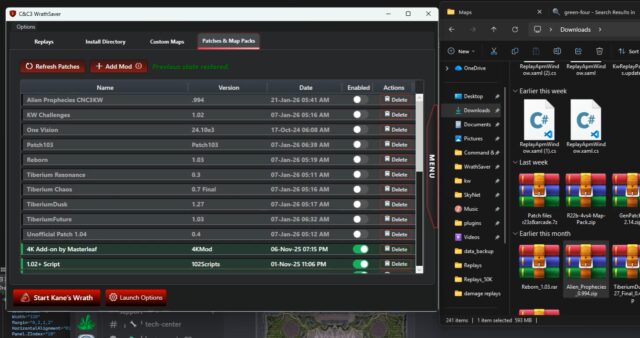
You can use the Beta tool WrathSaver.
But its Beta so you have to join Discord in order to receive it.
The reason is so if there are any bugs you can notify us.
https://discord.gg/HXJ9JGfeOr you can try commandpost https://cgf-uploads.net/
Change Thumbnail -
Generating thumbnail…
-
Generating thumbnail…
-
-
Yourhorse
AdministratorApril 3, 2026 at 6:29 pm in reply to: map pack installation for dummys (steam)Where do you have the game from? EA app, Steam ?
-
Are you playing the game in english or german ?
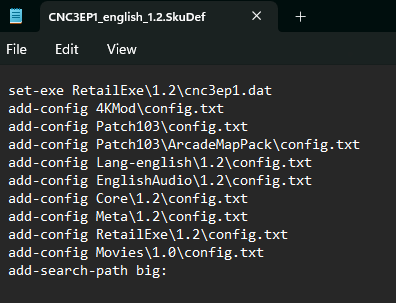
Please show me a screenshot of your file CNC3EP1_english_1.2.SkuDef and CNC3EP1_german16_1.2.SkuDef
You can open it in notepad
-
- Maybe you can show me some screenshots what you see ingame.
- Also show me whats in your SKudef file in below location.
\Command & Conquer 3 Kane's Wrath\CNC3EP1_{yourlanguage}_1.2.SkuDef- What mod are you using?
- Are you really sure you both are on version 1.2 (CTRL+T, chronoshoft)
- Do you have the game on Steam or EA app?
- Where did you place the mod, in what folder?
- Are you able to play with your friend if you disable the mod?
-
Found it, you put it in the wrong folder
It should be in here\HKEY_LOCAL_MACHINE\SOFTWARE\WOW6432Node\Electronic Arts\Electronic Arts\Command and Conquer 3 Kanes Wrath
So twice \Electronic Arts\Electronic Arts\